

Key Takeaways
- AI coding sessions are ephemeral. Plans, decisions, and reasoning disappear when a session ends, leaving no record for teammates or future reference.
- Using GitHub as a persistence layer keeps agent context alive across sessions, restarts, and team handoffs.
- Teams can review, comment on, and hand off AI-generated plans directly in GitHub without context-switching to Docs or Slack.
- When sessions restart or teammates take over a branch, agents can reload full context from the issue and pick up exactly where work left off.
- Any teammate can open the GitHub issue and see exactly what the agent proposed, what changed, and why, with no access to the original session needed.
AI coding assistants have fundamentally changed how we write software. Whether you're using Claude, Cursor, Windsurf, or another agent-powered tool, software is developed faster. But there's a problem nobody talks about enough: these sessions are islands.
Your agent helps you craft a brilliant implementation plan. You work through edge cases, make architectural decisions, and document trade-offs. Then the session ends, or compacts to save context, and all of that thinking evaporates. The next session starts fresh. The next engineer starts fresh. The code ships, but the reasoning behind it lives only in your memory.
We've been running into this problem for months. Here's how we solved it.
The Problem with AI Agent Coding Sessions
Picture this workflow: You start a session with an AI agent to implement a new feature. The agent asks clarifying questions, proposes an approach, and outlines a multi-step plan. It's good work. But before you start coding, you want your tech lead's input on the architecture.
What do you do?
Most teams resort to copy-pasting. You extract the plan from your session, paste it into a Google Doc, share the link in Slack, wait for feedback, then copy the suggestions back into a new session. The agent has no memory of the original context. You spend the first ten minutes re-explaining the problem.
This isn't a workflow. It's a workaround.
The core issues:
- Sessions are local and ephemeral. There's no shared surface where teammates can see what the agent planned or decided.
- The feedback loop is broken. Getting a review on an AI-generated plan requires leaving the agent's context entirely.
- Context doesn't survive. Session compaction, restarts, or switching machines means starting over.
- No audit trail. When you revisit code six months later, there's no record of why the agent made certain choices.
GitHub as the Collaboration Surface
We already use GitHub for version control. We use GitHub Issues for ticket tracking. Pull requests capture code review discussions. Why should AI agent context live somewhere else?
The insight was simple: make the GitHub issue the source of truth for agent context.
To make this work, you need a few things in place: a GitHub issue for the task, the gh CLI installed and authenticated, and an agent framework that supports skills or plugins. We built our workflow around OpenCode with a custom gh-context skill, but the pattern generalizes to any agent that can interact with GitHub. This workflow is designed for implementation work, the kind that lives in code, branches, and pull requests. It's not a replacement for design documents or architectural decision records, which benefit from richer formatting and are written primarily for humans to read and discuss. Those still belong in whatever document format your team uses. This workflow picks up where those leave off.
Here's how it works:
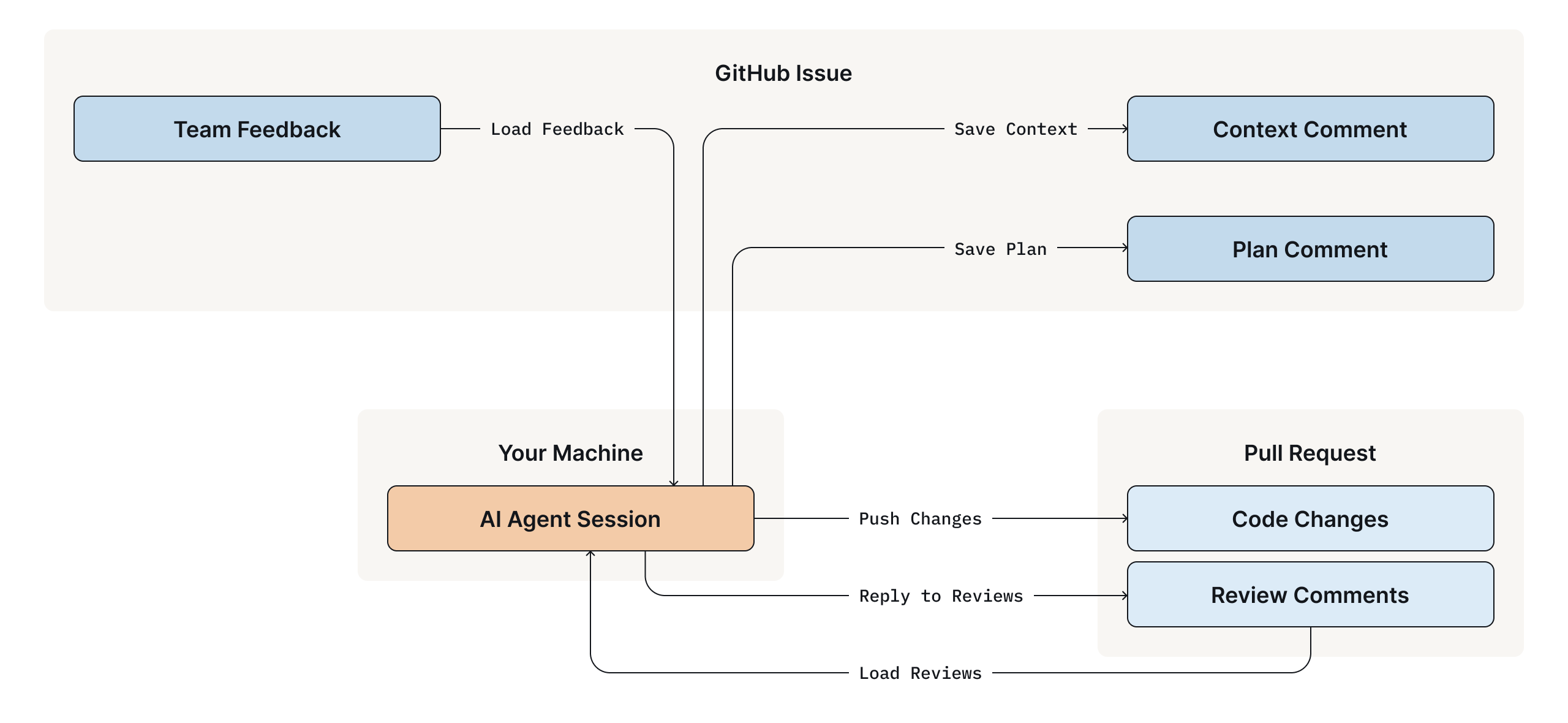
When you're working on a branch like feat/1234-add-alerts, you can ask the agent to "load context" or "save the plan." The agent recognizes the issue number from your branch name and syncs with the GitHub issue. Plans, decisions, and open questions are persisted as structured comments that are visible to your entire team.
Your colleagues review the plan by commenting on the issue. No Google Docs. No Slack threads. Just GitHub, where everything else already lives.
The Human ↔ Agent Loop
Here's the workflow we use to close the loop between human and agent:
1. Create an Issue and Branch
Start with a GitHub issue describing the task. Create a branch that includes the issue number:
feat/1234-implement-pagerduty-alerts
fix/GH-5678-handle-null-timestamps
The naming convention is flexible. Common patterns like feat/, fix/, issue-, or even bare 1234-description formats all work.
2. Plan and Persist
Ask the agent to create a plan for the issue. When you're satisfied, ask it to "save the plan." The agent posts a structured comment to the GitHub issue:
The plan appears on the issue with milestones, checkboxes, and context. Your teammates can review it without access to your session.
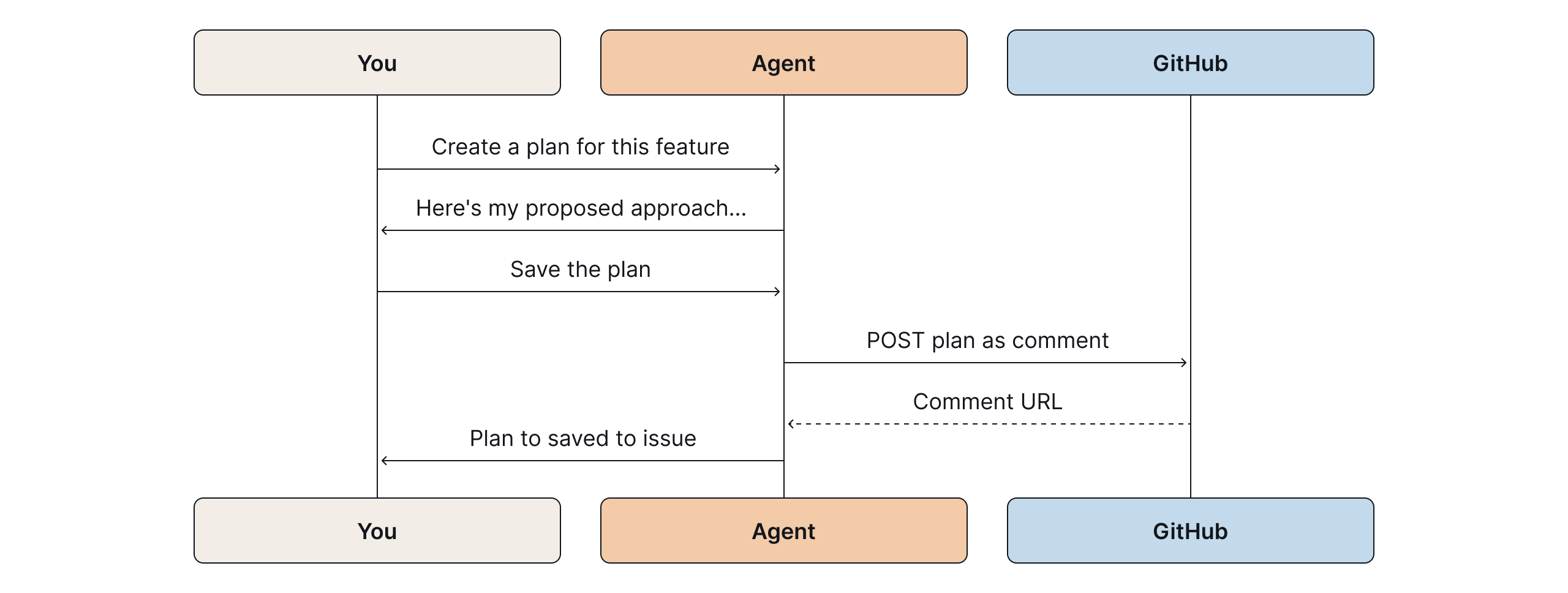
Every comment the agent posts includes a footer attributing it to the model that generated it. When you have multiple agents and humans all commenting on the same issue, this keeps things unambiguous. You always know what came from a human and what came from a model.
3. Incorporate Feedback
When colleagues comment on the issue with questions or suggestions, you don't need to copy-paste their feedback. Ask the agent to "load comments from the issue."
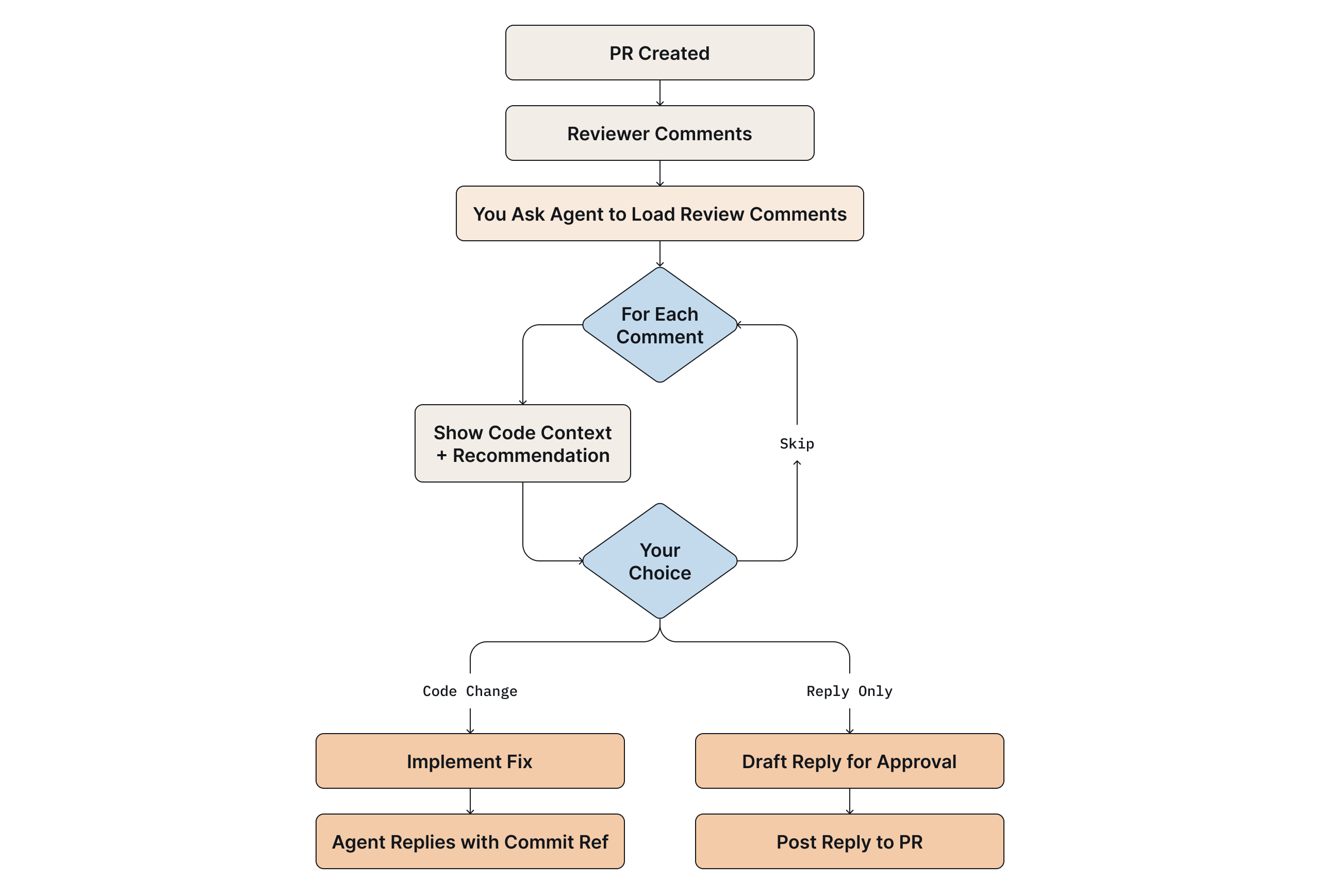
The agent fetches the comments, presents each one with a recommendation (reply, make a code change, or skip), and lets you address them directly. Replies quote the original comment for context, since GitHub issue comments are flat, this threading is essential for readability.
AI-generated review comments can be noisy. The agent filters them and gives you its reasoning on which are real issues worth acting on versus ones you can safely skip.
4. Context Survives
Session compacted? The machine restarted? Picked up the work a week later? Ask the agent to load context from the issue. It fetches the saved state and summarizes where you left off. Key decisions, modified files, and open questions are all there.
This also makes handoffs trivial. A teammate can pick up your branch, start their own session, and ask the agent to load context. The agent explains what's been done, what's pending, and what questions remain. A slack thread archaeology isn’t needed.
5. Code Review Integration
The workflow extends to pull requests. When reviewers leave comments, whether inline code review comments or general conversation, the agent can fetch and present them with the relevant code context and a recommendation for how to respond.
For tasks that involve a lot of GitHub API interaction, loading comments, saving context, replying to reviews, a faster lighter model works well. Save the more capable models for planning and implementation work where reasoning depth matters.
After pushing a PR, ask the agent to wait a few minutes and then poll for automated review comments from tools like Gemini or Codex. This lets the agent that built the feature respond to comments from a different model, giving you a lightweight multi-agent review loop without any extra orchestration.
Address a review comment with a code change, and the agent can reply referencing the fix. The entire review conversation stays in GitHub, but you never leave your session to participate in it.
Why This Works
- Everything in One Place: We stopped context-switching between tools. The plan isn't in a Google Doc. The decisions aren't buried in Slack. The review feedback isn't in email. It's all on the GitHub issue and PR where the code already lives.
- Agents Become Team Players: AI agents are often treated as individual productivity tools. But software is a team sport. By persisting context to GitHub, the agent's work becomes visible, reviewable, and auditable. Teammates can understand what the agent proposed without joining someone else’s session.
- Context Accumulates: Each session adds to the issue. By the time a feature ships, the issue has a full record of what was decided and why. That's useful six months later when someone does a git blame and finds more than a commit message that just says 'updates.' The PR links back to the issue, and the issue has the full reasoning.
- Handoffs Are Seamless: If someone else picks up the branch, they start a session and ask the agent to load context from the issue. They don’t need to dig through Slack threads or interrupt others.
The Shape of Collaborative AI
We didn't build anything new. GitHub issues, pull requests, and comments were already there. We just started using them as the persistence layer for agent sessions.
If your agent framework supports skills or plugins, you can build similar bridges to whatever collaboration surface your team uses. The only requirement is that agent context gets written somewhere your teammates can see it.
Agents that write their work down are agents your whole team can work with.
Frequently Asked Questions
Why do AI agent sessions lose context between conversations?
Most AI coding assistants like Claude, Cursor, and Windsurf don't persist session state by default, each new conversation starts fresh. Context can also be lost mid-session when a long conversation compacts to fit within the model's context window.
How can I share an AI agent's plan with my team for review?
The most durable approach is to have the agent post its plan as a structured comment on a GitHub issue. Your teammates can review and respond directly in GitHub, no copy-pasting into Slack or Google Docs required, and the context stays linked to the code.
What is the best way to preserve AI agent context across sessions?
Use a version-controlled platform like GitHub as the persistence layer. By saving plans, decisions, and open questions as issue comments, you can resume any session by asking the agent to load context from the issue even after a restart, a machine switch, or a week-long gap.
What is AGENTS.md and should we use it alongside this workflow?
AGENTS.md is a convention for documenting project standards, such as coding patterns, error handling, test expectations, so AI agents load them as context automatically. It complements the GitHub issue persistence layer described in this post: AGENTS.md handles static project-level context, while issue comments handle dynamic task-level context.
Can two AI agents review each other's work in this workflow?
Yes, the post describes a lightweight version of this: after pushing a PR, you can have the agent poll for automated review comments from tools like Gemini or Codex, then respond to them directly. This creates a multi-agent review loop without any extra orchestration infrastructure.